Find your setting.
Browse the mod’s settings by TOML section. Find out what each option changes, its source default, and where to find it in game.
Follow the menu path.
Start at Settings → Mod Settings. Each entry gives its menu path where a control exists. TOML only means editing the active community_patch_settings.toml. Find that file under Mod Settings → Advanced & Configuration → Settings file.
Make a change, know when it applies.
Most file edits reload after a short delay. Some settings need a view reopened or a restart. Menu controls depend on the installed build, platform and available hooks. Existing saved values take precedence over defaults.
Updated . PLAY defaults match v1.1.9.5-guffa.9. 356 reference entries, including 110 PLAY shortcuts and 4 DEV additions. 243 in-game menu locations mapped.
No settings match. Try a shorter phrase or a menu name.
Audio[audio]Notification sounds and game audio filters.16 entries
| Setting | Source default | What it does and where to find it |
|---|---|---|
coalescingAudio coalescing | "same" | While a sound plays: "none" allows replacement, "same" suppresses repeat requests for the same cue, "all" suppresses any replacement. Suppressed requests are discarded, not queued. In gameSettings Mod Settings Audio Alerts Audio coalescing Reload / feature-dependent |
alert_armada_battle_lostArmada defeat sound | "none" | Optional armada battle lost sound: built-in cue name or local WAV/MP3 path; "none" disables it. Requires toast hooks. In gameSettings Mod Settings Audio Alerts Armada defeat Sound Reload / feature-dependent |
alert_armada_battle_wonArmada victory sound | "none" | Optional armada battle won sound: built-in cue name or local WAV/MP3 path; "none" disables it. Requires toast hooks. In gameSettings Mod Settings Audio Alerts Armada victory Sound Reload / feature-dependent |
alert_armada_createdArmada created sound | "none" | Optional armada created sound: built-in cue name or local WAV/MP3 path; "none" disables it. Requires toast hooks. In gameSettings Mod Settings Audio Alerts Armada created Sound Reload / feature-dependent |
alert_defeatBattle defeat sound | "none" | Optional defeat sound: built-in cue name or local WAV/MP3 path; "none" disables it. Requires toast hooks. In gameSettings Mod Settings Audio Alerts Battle defeat Sound Reload / feature-dependent |
alert_victoryBattle victory sound | "none" | Optional victory sound: built-in cue name or local WAV/MP3 path; "none" disables it. Requires toast hooks. In gameSettings Mod Settings Audio Alerts Battle victory Sound Reload / feature-dependent |
alert_incoming_player_attackIncoming player attack (ships) sound | "none" | Optional incoming player attack sound: built-in cue name or local WAV/MP3 path; "none" disables it. Incoming player attacks against your own fleets only. In gameSettings Mod Settings Audio Alerts Incoming player attack (ships) Sound Reload / feature-dependent |
alert_fleet_arrived_in_systemArrived in system sound | "none" | Optional fleet arrived in system sound: built-in cue name or local WAV/MP3 path; "none" disables it. In gameSettings Mod Settings Audio Alerts Arrived in system Sound Reload / feature-dependent |
alert_fleet_arrived_at_destinationArrived at destination sound | "none" | Optional fleet arrived at destination sound: built-in cue name or local WAV/MP3 path; "none" disables it. In gameSettings Mod Settings Audio Alerts Arrived at destination Sound Reload / feature-dependent |
alert_fleet_started_miningStarted mining sound | "none" | Optional fleet started mining sound: built-in cue name or local WAV/MP3 path; "none" disables it. In gameSettings Mod Settings Audio Alerts Started mining Sound Reload / feature-dependent |
alert_fleet_node_depletedNode depleted sound | "none" | Optional fleet node depleted sound: built-in cue name or local WAV/MP3 path; "none" disables it. In gameSettings Mod Settings Audio Alerts Node depleted Sound Reload / feature-dependent |
alert_fleet_dockedDocked sound | "none" | Optional fleet docked sound: built-in cue name or local WAV/MP3 path; "none" disables it. In gameSettings Mod Settings Audio Alerts Docked Sound Reload / feature-dependent |
alert_fleet_repair_completeRepair complete sound | "none" | Optional fleet repair complete sound: built-in cue name or local WAV/MP3 path; "none" disables it. In gameSettings Mod Settings Audio Alerts Repair complete Sound Reload / feature-dependent |
alert_fleet_miner_opcMiner over protected cargo sound | "none" | Optional fleet miner opc sound: built-in cue name or local WAV/MP3 path; "none" disables it. In gameSettings Mod Settings Audio Alerts Miner over protected cargo Sound Reload / feature-dependent |
disabled_eventsDisabled events | "" | Comma-separated game audio-event names to suppress. Empty allows all; "All" suppresses all. Event names can be discovered with trace_events. TOML only Edit this key in its configuration section. Reload / feature-dependent |
trace_eventsTrace events | false | Write game audio-event names to trace logging for troubleshooting; this does not select alert sounds. TOML only Edit this key in its configuration section. Reload / feature-dependent |
Buffs[buffs]Ship power display preferences.1 entries
| Setting | Source default | What it does and where to find it |
|---|---|---|
use_out_of_dock_powerUse out-of-dock power | true | Use deployed-ship power for supported displays. In gameSettings Mod Settings Officers & Ships Use out-of-dock power Restart |
Config[config]Advanced game endpoint overrides.2 entries
| Setting | Source default | What it does and where to find it |
|---|---|---|
assets_url_overrideAssets url override | "" | Developer override for game assets. Normally leave empty. TOML only Edit this key in its configuration section. Reload / feature-dependent |
settings_urlSettings url | "" | Developer override for the game's server-settings URL. Normally leave empty. TOML only Edit this key in its configuration section. Reload / feature-dependent |
Control[control]Input modes, shortcut availability and action queues.10 entries
| Setting | Source default | What it does and where to find it |
|---|---|---|
kirshara_fixesKirshara queue protections | true | Protect and recover Kir’Shara queues after target or address changes. In gameSettings Mod Settings Controls Kirshara queue protections Reload / feature-dependent |
primary_requires_visible_targetRequire visible primary target | false | Require a visible target for the primary action shortcut. In gameSettings Mod Settings Controls Require visible primary target Live |
primary_protects_queueProtect queue from primary action | false | Block the primary-action shortcut while the selected ship has queued targets. You can still add targets or clear the queue. In gameSettings Mod Settings Controls Protect queue from primary action Live |
select_timerShip selection interval | 500 | Maximum interval between repeated ship-selection shortcuts. In gameSettings Mod Settings Controls Ship selection interval Live |
hotkeys_enabledEnable mod shortcuts | true | Use configured mod keyboard and mouse shortcuts. In gameSettings Mod Settings Controls Enable mod shortcuts Live |
hotkeys_extendedExtended shortcut actions | true | Change extended action availability after restart. In gameSettings Mod Settings Controls Extended shortcut actions Restart |
queue_enabledEnable action queue | true | If you have the Kir'Shara artifact, should the queue be enabled by default? In gameSettings Mod Settings Controls Enable action queue Reload / feature-dependent |
use_scopely_hotkeysUse native game shortcuts | false | Use the game's shortcuts instead of mod bindings. In gameSettings Mod Settings Controls Use native game shortcuts Restart |
keyboard_layout_modeKeyboard layout mode | "physical" | Shortcut key positions: "physical" (default) or "layout" for supported printable characters on the active Windows keyboard layout. The layout-aware adapter is Windows-specific. TOML only Edit this key in its configuration section. Reload / feature-dependent |
enable_experimentalEnable experimental | false | Enable experimental shortcut actions. These also require extended shortcuts. Ordinary camera speed and glide controls do not require this. TOML only Edit this key in its configuration section. Reload / feature-dependent |
Graphics[graphics]Camera, scaling, map labels and loading screens.53 entries
| Setting | Source default | What it does and where to find it |
|---|---|---|
galaxy_extended_selectionExtended system selection | true | Select minor systems at far Galaxy zoom without enabling all their rendered entities. In gameSettings Mod Settings Galaxy Labels Extended system selection Live |
galaxy_multi_selectSelect multiple overlays | true | Combine the native Default, Mining, Hostiles and Hazards overlay buttons. This does not turn every overlay on automatically. In gameSettings Mod Settings Galaxy Labels Select multiple overlays Reload / feature-dependent |
galaxy_station_housingStation housing | true | Show known station-housing systems from static system data. Does not report live free docking slots. In gameSettings Mod Settings Galaxy Labels Station housing Reload / feature-dependent |
galaxy_starbase_systemsAlliance Starbase systems | true | Mark known Plasma Storm systems suitable for Alliance Starbase deployment. Does not report live Starbase positions or free anchoring slots. In gameSettings Mod Settings Galaxy Labels Alliance Starbase systems Reload / feature-dependent |
galaxy_overlay_defaultDefault (system names) | true | Initial Default overlay selection. If all four overlay settings are false, the reader restores Default. In gameSettings Mod Settings Galaxy Labels Default (system names) Reload / feature-dependent |
galaxy_overlay_miningMining | false | Initial Mining overlay selection; combine layers when galaxy_multi_select is enabled. In gameSettings Mod Settings Galaxy Labels Mining Reload / feature-dependent |
galaxy_overlay_hostilesHostiles | false | Initial Hostiles overlay selection; combine layers when galaxy_multi_select is enabled. In gameSettings Mod Settings Galaxy Labels Hostiles Reload / feature-dependent |
galaxy_overlay_hazardsHazards | false | Initial Hazards overlay selection; combine layers when galaxy_multi_select is enabled. In gameSettings Mod Settings Galaxy Labels Hazards Reload / feature-dependent |
galaxy_label_major_detailMajor system labels | "native" | Major-system Galaxy labels: "native", "always", or "threshold". Independent of minor-system labels. In gameSettings Mod Settings Galaxy Labels Major system labels Reload / feature-dependent |
galaxy_label_minor_detailMinor system labels | "native" | Minor-system Galaxy labels: "native", "always", or "threshold". Independent of major-system labels. In gameSettings Mod Settings Galaxy Labels Minor system labels Reload / feature-dependent |
galaxy_label_major_thresholdMajor label zoom threshold | 0.5 | Major-system crossover for threshold mode, normalized 0–1. 0 never expands; 1 always expands. In gameSettings Mod Settings Galaxy Labels Major label zoom threshold Reload / feature-dependent |
galaxy_label_minor_thresholdMinor label zoom threshold | 0.5 | Minor-system crossover for threshold mode, normalized 0–1. 0 never expands; 1 always expands. In gameSettings Mod Settings Galaxy Labels Minor label zoom threshold Reload / feature-dependent |
fr_scalePlanet backdrop scale | 2.0 | Scale flat planet backdrops in System view. 1.0 preserves their native size; restart after changing. In gameSettings Mod Settings Interface & Scale Planet backdrop scale Restart |
transition_timeTransition time | 0.01 | Read for compatibility; no feature applies this value. TOML only Edit this key in its configuration section. Legacy / inactive |
ui_scaleInterface scale | 0.0 | 0.0 preserves the game's own interface scale. Positive values override it; Windows display scaling is also applied. The Page Up/Down scale shortcuts do not enable an override while this is zero. In gameSettings Mod Settings Interface & Scale Interface scale Live |
ui_scale_shipShip scale | 1.0 | Multiplier for system-view ship models. 1.0 preserves native ship size. In gameSettings Mod Settings Interface & Scale Ship scale Reload / feature-dependent |
ui_scale_stepScale shortcut step | 0.05 | Step used by interface, ship-model and viewer scale shortcuts. In gameSettings Mod Settings Interface & Scale Scale shortcut step Live |
ui_scale_viewerViewer scale | 1.2 | Scale ship/officer object viewers; 0.0 preserves native viewer scale. Reopen the viewer after a change. In gameSettings Mod Settings Interface & Scale Viewer scale Reopen affected view |
ship_hotkey_badgesShip shortcut badges | true | Show configured ship shortcut hints. In gameSettings Mod Settings System Labels Ship shortcut badges Live |
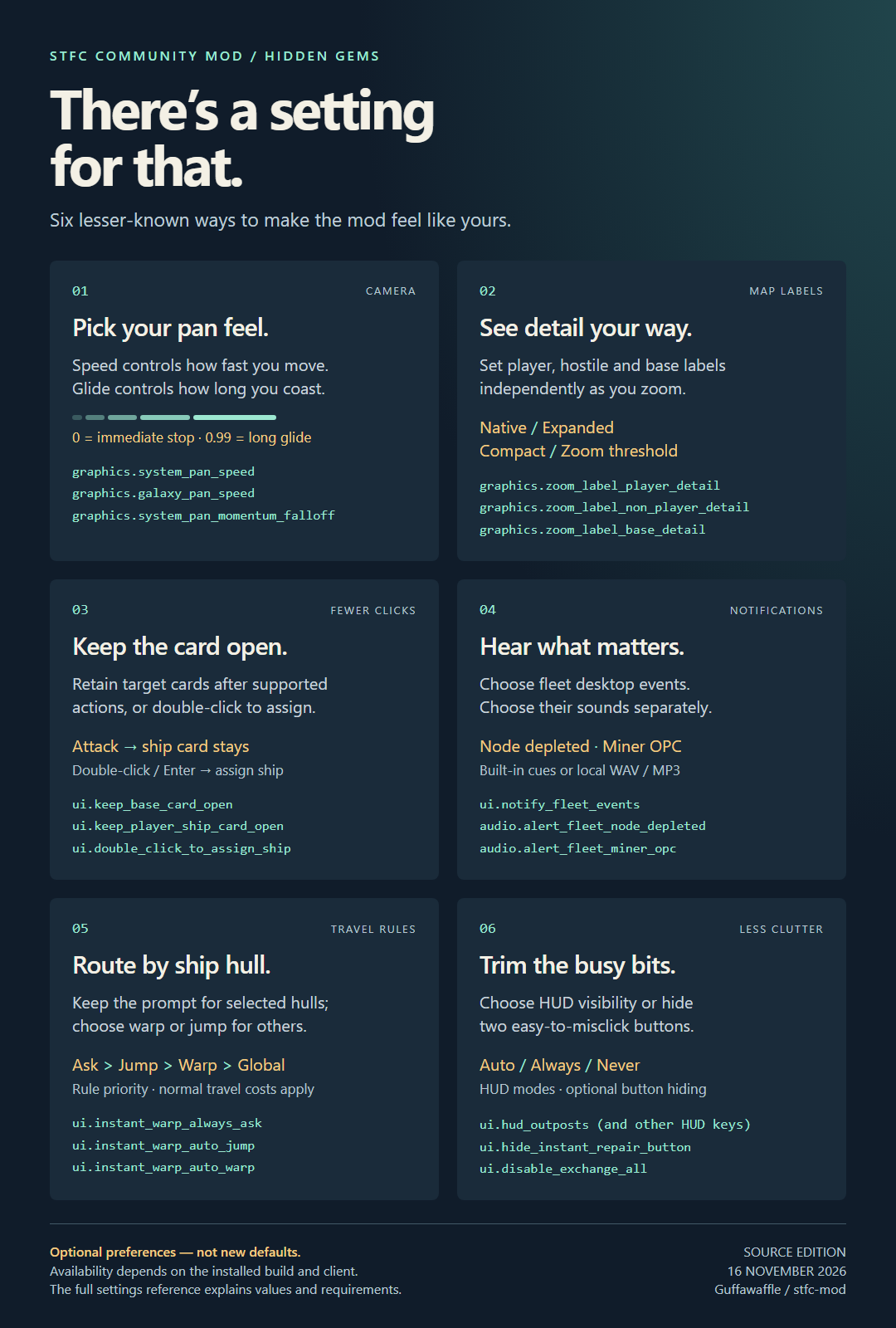
zoom_label_non_player_detailNon-player label detail | "native" | Non-player/unknown fleet labels in System view: "native", "expanded", "compact", or "threshold". In gameSettings Mod Settings System Labels Non-player label detail Reload / feature-dependent |
zoom_label_non_player_thresholdNon-player detail threshold | 0.5 | Non-player fleet label crossover in threshold mode, 0–1. 0 always compact; 1 always expanded. In gameSettings Mod Settings System Labels Non-player detail threshold Reload / feature-dependent |
zoom_label_player_detailPlayer label detail | "native" | Player fleet labels in System view: "native", "expanded", "compact", or "threshold". In gameSettings Mod Settings System Labels Player label detail Reload / feature-dependent |
zoom_label_player_thresholdPlayer detail threshold | 0.5 | Player fleet label crossover in threshold mode, 0–1. 0 always compact; 1 always expanded. In gameSettings Mod Settings System Labels Player detail threshold Reload / feature-dependent |
zoom_label_base_detailPlayer base label detail | "native" | Player base details: "native", "expanded", "compact", or "threshold". Expanded retains level/diplomacy badges; full names remain close-up. In gameSettings Mod Settings System Labels Player base label detail Reload / feature-dependent |
zoom_label_base_thresholdPlayer base detail threshold | 0.5 | Base label crossover in threshold mode, 0–1. 0 always compact; 1 always expanded. In gameSettings Mod Settings System Labels Player base detail threshold Reload / feature-dependent |
keyboard_zoom_speedKeyboard zoom speed | 350.0 | Speed of keyboard zoom. In gameSettings Mod Settings Camera Keyboard zoom speed Live |
system_pan_speedSystem pan speed | 1.0 | System-view mouse/touch and keyboard pan multiplier. 1.0 normal, 0.5 half speed, 1.5 faster. Accepted range 0.1–10; slider 0.1–3, exact entry up to 10. Live. In gameSettings Mod Settings Camera System pan speed Live |
galaxy_pan_speedGalaxy pan speed | 1.0 | Independent Galaxy-view mouse/touch and keyboard pan multiplier. Range 0.1–10; 1.0 normal. Live. In gameSettings Mod Settings Camera Galaxy pan speed Live |
system_pan_momentumSystem pan momentum | 0.4 | Legacy compatibility value with no runtime effect. Use system_pan_speed and system_pan_momentum_falloff. TOML only Edit this key in its configuration section. Legacy / inactive |
system_pan_momentum_falloffPan glide | 0.8 | Pan motion retained per update after release: lower stops sooner, 0 stops immediately, 0.99 gives a long glide. Clamped to 0–0.99. Live; no experimental flag required. In gameSettings Mod Settings Camera Pan glide Live |
loader_enabledCustom loading background | true | Replace the login background with the configured image. In gameSettings Mod Settings Loading Screens Custom loading background Restart |
loader_imageLoading image path | "" | Local PNG loading-background path; empty uses the embedded image. In gameSettings Mod Settings Loading Screens Loading image path Restart |
loader_logo_scaleLoading logo scale | 1.0 | Multiplier for the loading-screen logo. In gameSettings Mod Settings Loading Screens Loading logo scale Restart |
loader_tip_enabledLoading tips | true | Show loading tips on supported screens. In gameSettings Mod Settings Loading Screens Loading tips Restart |
loader_transitionCustom transition background | true | Use the configured image during transitions. When false, the reader forces loader_transition_black to true. In gameSettings Mod Settings Loading Screens Custom transition background Restart |
loader_transition_blackBlack transition background | false | Keep transition backgrounds black while retaining applicable logos. Also forced on when custom transitions are off. In gameSettings Mod Settings Loading Screens Black transition background Restart |
allow_cursorAllow cursor changes | true | Allow the game to change the cursor. In gameSettings Mod Settings Interface & Scale Allow cursor changes Live · Windows only |
borderless_fullscreenBorderless fullscreen | true | Retained compatibility value. This source does not activate the old F11 borderless-fullscreen hook. TOML only Edit this key in its configuration section. Legacy / inactive |
free_resizeFree window resizing | true | Allow arbitrary window sizes on Windows. In gameSettings Mod Settings Interface & Scale Free window resizing Restart · Windows only |
galactic_anomaly_timerGalactic Anomaly timer | true | Show remaining lifetime on supported Galactic Anomalies. In gameSettings Mod Settings Map & Travel Galactic Anomaly timer Live |
use_presets_as_defaultUse last preset as default zoom | true | Selecting a preset updates the session's default zoom. In gameSettings Mod Settings Camera Use last preset as default zoom Live |
default_system_zoomDefault system zoom | 1750.0 | Camera distance on system entry/reset; 0 preserves native entry zoom. In gameSettings Mod Settings Camera Default system zoom Reload / feature-dependent |
haven_zoomHaven zoom-out distance | 4000.0 | Maximum Haven zoom-out distance; 0 preserves the native limit. In gameSettings Mod Settings Camera Haven zoom-out distance Live |
hide_haven_waterHide Haven water | false | Hide water while in Haven. In gameSettings Mod Settings Camera Hide Haven water Live |
system_camera_orbitSystem camera rotation | true | System camera rotation. Requires mod shortcuts; Galaxy and Haven keep their own controls. Hold middle-mouse and drag to rotate; Alt + middle-mouse resets the view. Live; default on. In gameSettings Mod Settings Camera System camera rotation Reload / feature-dependent |
interior_zoom_scaleStation interior zoom-out | 2.0 | Station-interior zoom-out multiplier, at least 1.0; 1.0 uses the native limit. In gameSettings Mod Settings Camera Station interior zoom-out Live |
system_zoom_preset_1Zoom preset 1 | 50.0 | Distance for zoom preset 1. In gameSettings Mod Settings Camera Zoom preset 1 Live |
system_zoom_preset_2Zoom preset 2 | 500.0 | Distance for zoom preset 2. In gameSettings Mod Settings Camera Zoom preset 2 Live |
system_zoom_preset_3Zoom preset 3 | 1250.0 | Distance for zoom preset 3. In gameSettings Mod Settings Camera Zoom preset 3 Live |
system_zoom_preset_4Zoom preset 4 | 2750.0 | Distance for zoom preset 4. In gameSettings Mod Settings Camera Zoom preset 4 Live |
system_zoom_preset_5Zoom preset 5 | 5000.0 | Distance for zoom preset 5. In gameSettings Mod Settings Camera Zoom preset 5 Live |
zoomSystem zoom-out distance | 5000.0 | Maximum system-camera distance. In gameSettings Mod Settings Camera System zoom-out distance Live |
disable_target_camera_lockDisable target camera lock | false | Suppress the automatic camera lock on a selected system target where the zoom hooks support it. TOML only Edit this key in its configuration section. Reload / feature-dependent |
Patches[patches]Startup compatibility switches for hook groups.52 entries
These switches require a restart. Enabling a hook group permits installation; the client and build determine availability.
| Setting | Source default | What it does and where to find it |
|---|---|---|
abilitybuttonrecoveryhooksAbilitybuttonrecoveryhooks | true | Startup hooks for: Ability Buttons. TOML only Edit this key in its configuration section. Restart-only compatibility switch; enabled does not prove installed |
actionqueuerecoveryhooksActionqueuerecoveryhooks | true | Startup hooks for: Action Queue Recovery. TOML only Edit this key in its configuration section. Restart-only compatibility switch; enabled does not prove installed |
alliancegamesstorehooksAlliancegamesstorehooks | true | Startup hooks for: Alliance Games Store. TOML only Edit this key in its configuration section. Restart-only compatibility switch; enabled does not prove installed |
artifactexchangehooksArtifactexchangehooks | true | Startup hooks for: Artifact Exchange. TOML only Edit this key in its configuration section. Restart-only compatibility switch; enabled does not prove installed |
audioeventhooksAudioeventhooks | true | Startup hooks for: Audio. TOML only Edit this key in its configuration section. Restart-only compatibility switch; enabled does not prove installed |
basecardhooksBasecardhooks | true | Startup hooks for: Base Card. TOML only Edit this key in its configuration section. Restart-only compatibility switch; enabled does not prove installed |
battlelogsummaryhooksBattlelogsummaryhooks | true | Startup hooks for: AAIReport Observer, AAIBack, Battle Log Summary. TOML only Edit this key in its configuration section. Restart-only compatibility switch; enabled does not prove installed |
bufffixhooksBufffixhooks | true | Startup hooks for: Out Of Dock Power. TOML only Edit this key in its configuration section. Restart-only compatibility switch; enabled does not prove installed |
cargoformathooksCargoformathooks | true | Startup hooks for: Cargo Format. TOML only Edit this key in its configuration section. Restart-only compatibility switch; enabled does not prove installed |
chatpatchesChatpatches | true | Startup hooks for: Chat, Chat Avatar Retention. TOML only Edit this key in its configuration section. Restart-only compatibility switch; enabled does not prove installed |
chattitledisplayhooksChattitledisplayhooks | true | Startup hooks for: Chat Titles. TOML only Edit this key in its configuration section. Restart-only compatibility switch; enabled does not prove installed |
dailyfactionbulkclaimhooksDailyfactionbulkclaimhooks | true | Startup hooks for: Daily Claim Filter. TOML only Edit this key in its configuration section. Restart-only compatibility switch; enabled does not prove installed |
doubleclickassignshiphooksDoubleclickassignshiphooks | true | Startup hooks for: Double Click Assign. TOML only Edit this key in its configuration section. Restart-only compatibility switch; enabled does not prove installed |
forbiddentechconfirmhooksForbiddentechconfirmhooks | true | Startup hooks for: Forbidden Tech Confirm. TOML only Edit this key in its configuration section. Restart-only compatibility switch; enabled does not prove installed |
forbiddentechshipnamehooksForbiddentechshipnamehooks | true | Startup hooks for: Forbidden Tech Ship Name. TOML only Edit this key in its configuration section. Restart-only compatibility switch; enabled does not prove installed |
freeresizehooksFreeresizehooks | true | Startup hooks for: Free Resize. TOML only Edit this key in its configuration section. Restart-only compatibility switch; enabled does not prove installed |
galacticanomalytimerhooksGalacticanomalytimerhooks | true | Startup hooks for: Anomaly Timer. TOML only Edit this key in its configuration section. Restart-only compatibility switch; enabled does not prove installed |
game_versionGame version | true | Include the client game-version header in sync requests. This is a startup-frozen compatibility control, rather than a player feature toggle. TOML only Edit this key in its configuration section. Restart-only compatibility switch; enabled does not prove installed |
giftsbulkclaimhooksGiftsbulkclaimhooks | true | Startup hooks for: Gifts Auto Open. TOML only Edit this key in its configuration section. Restart-only compatibility switch; enabled does not prove installed |
havenhistoryhooksHavenhistoryhooks | true | Startup hooks for: Haven History. TOML only Edit this key in its configuration section. Restart-only compatibility switch; enabled does not prove installed |
havenzoomhooksHavenzoomhooks | true | Startup hooks for: Haven Zoom, Haven Orbit. TOML only Edit this key in its configuration section. Restart-only compatibility switch; enabled does not prove installed |
hotkeyhooksHotkeyhooks | true | Startup hooks for: Assign On Enter, Dock Selection, Fleet Action Maintenance, Hotkeys, Keyboard Confirm, Mining Preview. TOML only Edit this key in its configuration section. Restart-only compatibility switch; enabled does not prove installed |
instantcargocounterhooksInstantcargocounterhooks | true | Startup hooks for: Instant Cargo. TOML only Edit this key in its configuration section. Restart-only compatibility switch; enabled does not prove installed |
instantrepairbuttonhooksInstantrepairbuttonhooks | true | Startup hooks for: Instant Repair Button. TOML only Edit this key in its configuration section. Restart-only compatibility switch; enabled does not prove installed |
interiorzoomhooksInteriorzoomhooks | true | Startup hooks for: Interior Zoom. TOML only Edit this key in its configuration section. Restart-only compatibility switch; enabled does not prove installed |
loadingscreenhooksLoadingscreenhooks | true | Startup hooks for: Login Screen. TOML only Edit this key in its configuration section. Restart-only compatibility switch; enabled does not prove installed |
loadingtiphooksLoadingtiphooks | true | Startup hooks for: Loading Tips. TOML only Edit this key in its configuration section. Restart-only compatibility switch; enabled does not prove installed |
miscpatchesMiscpatches | true | Startup hooks for: Shop Limits, Donation Limit. TOML only Edit this key in its configuration section. Restart-only compatibility switch; enabled does not prove installed |
missionhudtweakshooksMissionhudtweakshooks | true | Startup hooks for: Mission Hud. TOML only Edit this key in its configuration section. Restart-only compatibility switch; enabled does not prove installed |
navigationorbithooksNavigationorbithooks | true | Startup hooks for: Navigation Orbit. TOML only Edit this key in its configuration section. Restart-only compatibility switch; enabled does not prove installed |
objecttrackerObjecttracker | true | Startup hooks for: Object Tracker. TOML only Edit this key in its configuration section. Restart-only compatibility switch; enabled does not prove installed |
officerpresetreorderhooksOfficerpresetreorderhooks | true | Startup hooks for: Officer Preset Reorder. TOML only Edit this key in its configuration section. Restart-only compatibility switch; enabled does not prove installed |
officersorthooksOfficersorthooks | true | Startup hooks for: Officer Sort. TOML only Edit this key in its configuration section. Restart-only compatibility switch; enabled does not prove installed |
opcindicatorhooksOpcindicatorhooks | true | Startup hooks for: Opc Indicators. TOML only Edit this key in its configuration section. Restart-only compatibility switch; enabled does not prove installed |
panhooksPanhooks | true | Startup hooks for: Pan. TOML only Edit this key in its configuration section. Restart-only compatibility switch; enabled does not prove installed |
pinnedshipclicktogglePinnedshipclicktoggle | true | Retained compatibility key; no feature consumes this switch in the audited source. Current ship pinning uses pinnedshiphooks. TOML only Edit this key in its configuration section. Restart-only compatibility switch; enabled does not prove installed |
pinnedshiphooksPinnedshiphooks | true | Startup hooks for: Pinned Ships, Pinned Ship Click. TOML only Edit this key in its configuration section. Restart-only compatibility switch; enabled does not prove installed |
queueaddressguardhooksQueueaddressguardhooks | true | Startup hooks for: Queue Address Guard. TOML only Edit this key in its configuration section. Restart-only compatibility switch; enabled does not prove installed |
revealconfirmhooksRevealconfirmhooks | true | Startup hooks for: Reveal Confirm. TOML only Edit this key in its configuration section. Restart-only compatibility switch; enabled does not prove installed |
runtimeconfighooksRuntimeconfighooks | true | Allow the runtimeconfighooks hook group at startup. TOML only Edit this key in its configuration section. Restart-only compatibility switch; enabled does not prove installed |
shiptechindicatorhooksShiptechindicatorhooks | true | Startup hooks for: Ship Tech Indicators. TOML only Edit this key in its configuration section. Restart-only compatibility switch; enabled does not prove installed |
syncpatchesSyncpatches | true | Allow the syncpatches hook group at startup. TOML only Edit this key in its configuration section. Restart-only compatibility switch; enabled does not prove installed |
systemshipcounterhooksSystemshipcounterhooks | true | Startup hooks for: System Ship Counter. TOML only Edit this key in its configuration section. Restart-only compatibility switch; enabled does not prove installed |
tempcrashfixesTempcrashfixes | true | Startup hooks for: Buff Crash Guard, Skip Reveal Sequence. TOML only Edit this key in its configuration section. Restart-only compatibility switch; enabled does not prove installed |
testpatchesTestpatches | true | Startup hooks for: Queue Switch, Game Config Overrides, Cursor. TOML only Edit this key in its configuration section. Restart-only compatibility switch; enabled does not prove installed |
thinqueueprotectionhooksThinqueueprotectionhooks | true | Startup hooks for: Thin Queue Protection. TOML only Edit this key in its configuration section. Restart-only compatibility switch; enabled does not prove installed |
toastbannerhooksToastbannerhooks | true | Startup hooks for: Toasts. TOML only Edit this key in its configuration section. Restart-only compatibility switch; enabled does not prove installed |
fleetnotificationhooksFleetnotificationhooks | true | Startup hooks for: Fleet Notifications, Fleet Node Depletion. TOML only Edit this key in its configuration section. Restart-only compatibility switch; enabled does not prove installed |
nativesettingshooksNativesettingshooks | true | Startup hooks for: Native Settings, Native Settings Actions, Native Settings Pages, Native Settings Search, Native Settings Text Entry, Native Settings Text Entry, Native Settings Values. TOML only Edit this key in its configuration section. Restart-only compatibility switch; enabled does not prove installed |
transitionscreenhooksTransitionscreenhooks | true | Startup hooks for: Transition Screen. TOML only Edit this key in its configuration section. Restart-only compatibility switch; enabled does not prove installed |
uiscalehooksUiscalehooks | true | Startup hooks for: Ui Scale. TOML only Edit this key in its configuration section. Restart-only compatibility switch; enabled does not prove installed |
zoomhooksZoomhooks | true | Startup hooks for: Zoom, Scroll Zoom Guard, Fleet Labels, Base Labels, Galaxy Labels, Galaxy Selection, Ship Shortcut Badges. TOML only Edit this key in its configuration section. Restart-only compatibility switch; enabled does not prove installed |
Shortcuts[shortcuts]Every remappable keyboard and mouse action.110 entries
| separates alternatives. MOUSE0 is left, MOUSE1 right and MOUSE2 middle. Extended and experimental requirements appear on each action.
| Setting | Source default | What it does and where to find it |
|---|---|---|
move_upPan up | "W|UP" | Move Up. In gameSettings Mod Settings Shortcuts Camera Pan up Standard shortcut |
move_downPan down | "S|DOWN" | Move Down. In gameSettings Mod Settings Shortcuts Camera Pan down Standard shortcut |
move_leftPan left | "A|LEFT" | Move Left. In gameSettings Mod Settings Shortcuts Camera Pan left Standard shortcut |
move_rightPan right | "D|RIGHT" | Move Right. In gameSettings Mod Settings Shortcuts Camera Pan right Standard shortcut |
set_hotkeys_disabledDisable mod shortcuts | "CTRL-ALT-MINUS" | Disable Hot Keys. In gameSettings Mod Settings Shortcuts Client Disable mod shortcuts Standard shortcut; accepted old keys: set_hotkeys_disble, set_hotkeys_disable |
set_hotkeys_enabledEnable mod shortcuts | "CTRL-ALT-=" | Enable Hot Keys. In gameSettings Mod Settings Shortcuts Client Enable mod shortcuts Standard shortcut; accepted old keys: set_hotkeys_enable |
select_chatallianceSwitch to alliance chat | "CTRL-2" | Select Chat Alliance. In gameSettings Mod Settings Shortcuts Chat Switch to alliance chat Standard shortcut |
select_chatglobalSwitch to global chat | "CTRL-1" | Select Chat Global. In gameSettings Mod Settings Shortcuts Chat Switch to global chat Standard shortcut |
select_chatprivateSwitch to private chat | "CTRL-3" | Select Chat Private. In gameSettings Mod Settings Shortcuts Chat Switch to private chat Standard shortcut |
quitForce close client | "F10" | Force-close the game client, allowing up to 0.5 seconds for pending saves. In gameSettings Mod Settings Shortcuts Client Force close client Standard shortcut |
select_ship1Select ship 1 | "1" | See select_timer In gameSettings Mod Settings Shortcuts Fleet Controls Select ship 1 Standard shortcut |
select_ship2Select ship 2 | "2" | See select_timer In gameSettings Mod Settings Shortcuts Fleet Controls Select ship 2 Standard shortcut |
select_ship3Select ship 3 | "3" | See select_timer In gameSettings Mod Settings Shortcuts Fleet Controls Select ship 3 Standard shortcut |
select_ship4Select ship 4 | "4" | See select_timer In gameSettings Mod Settings Shortcuts Fleet Controls Select ship 4 Standard shortcut |
select_ship5Select ship 5 | "5" | See select_timer In gameSettings Mod Settings Shortcuts Fleet Controls Select ship 5 Standard shortcut |
select_ship6Select ship 6 | "6" | See select_timer In gameSettings Mod Settings Shortcuts Fleet Controls Select ship 6 Standard shortcut |
select_ship7Select ship 7 | "7" | See select_timer In gameSettings Mod Settings Shortcuts Fleet Controls Select ship 7 Standard shortcut |
select_ship8Select ship 8 | "8" | See select_timer In gameSettings Mod Settings Shortcuts Fleet Controls Select ship 8 Standard shortcut |
select_currentLocate selected ship | "CTRL-SPACE" | Select Current. In gameSettings Mod Settings Shortcuts Fleet Controls Locate selected ship Standard shortcut |
focus_searchFocus search | "CTRL-F" | Focus the current screen's search field In gameSettings Mod Settings Shortcuts Interface Controls Focus search Standard shortcut |
action_primaryPrimary action | "SPACE|MOUSE1" | SPACE or Mouse1 In gameSettings Mod Settings Shortcuts Fleet Controls Primary action Standard shortcut |
action_secondarySecondary action | "TAB|MOUSE4" | TAB or Mouse4 In gameSettings Mod Settings Shortcuts Fleet Controls Secondary action Standard shortcut |
action_queueQueue action | "SPACE|MOUSE1" | Requires Kir'Shara In gameSettings Mod Settings Shortcuts Fleet Controls Queue action Standard shortcut |
action_queue_clearClear action queue | "CTRL-C" | Does not cancel primary attack In gameSettings Mod Settings Shortcuts Fleet Controls Clear action queue Standard shortcut |
action_viewView target details | "V|MOUSE2" | V or Mouse2 In gameSettings Mod Settings Shortcuts Fleet Controls View target details Standard shortcut |
action_recallRecall selected ship | "R|MOUSE3" | R or Mouse3 In gameSettings Mod Settings Shortcuts Fleet Controls Recall selected ship Standard shortcut |
action_recall_cancelCancel recall | "SPACE|MOUSE1" | SPACE or Mouse1 In gameSettings Mod Settings Shortcuts Fleet Controls Cancel recall Standard shortcut |
action_repairRepair selected ship | "R|MOUSE3" | R or Mouse3 In gameSettings Mod Settings Shortcuts Fleet Controls Repair selected ship Standard shortcut |
show_chatOpen chat | "C" | Show Chat Full Screen In gameSettings Mod Settings Shortcuts Chat Open chat Standard shortcut |
show_chatside1Open side chat 1 | "ALT-C" | Show Chat Left In gameSettings Mod Settings Shortcuts Chat Open side chat 1 Standard shortcut |
show_chatside2Open side chat 2 | "`" | Show Chat Right In gameSettings Mod Settings Shortcuts Chat Open side chat 2 Standard shortcut |
show_galaxyView galaxy | "G" | Go to Galaxy In gameSettings Mod Settings Shortcuts Map & Travel View galaxy Standard shortcut |
show_galaxy_nativeView galaxy (native shortcut) | "CTRL-G" | Go to Galaxy (Native) In gameSettings Mod Settings Shortcuts Map & Travel View galaxy (native shortcut) Standard shortcut; accepted old keys: native_shortcut_galaxy |
show_systemView system | "H" | Go to System In gameSettings Mod Settings Shortcuts Map & Travel View system Standard shortcut |
zoom_preset1Use zoom preset 1 | "F1" | Zoom Preset1. In gameSettings Mod Settings Shortcuts Camera Use zoom preset 1 Standard shortcut |
zoom_preset2Use zoom preset 2 | "F2" | Zoom Preset2. In gameSettings Mod Settings Shortcuts Camera Use zoom preset 2 Standard shortcut |
zoom_preset3Use zoom preset 3 | "F3" | Zoom Preset3. In gameSettings Mod Settings Shortcuts Camera Use zoom preset 3 Standard shortcut |
zoom_preset4Use zoom preset 4 | "F4" | Zoom Preset4. In gameSettings Mod Settings Shortcuts Camera Use zoom preset 4 Standard shortcut |
zoom_preset5Use zoom preset 5 | "F5" | Zoom Preset5. In gameSettings Mod Settings Shortcuts Camera Use zoom preset 5 Standard shortcut |
zoom_inZoom in | "Q" | Zoom In. In gameSettings Mod Settings Shortcuts Camera Zoom in Standard shortcut |
zoom_outZoom out | "E" | Zoom Out. In gameSettings Mod Settings Shortcuts Camera Zoom out Standard shortcut |
zoom_maxZoom to maximum | "MINUS" | Zoom Max. In gameSettings Mod Settings Shortcuts Camera Zoom to maximum Standard shortcut |
zoom_minZoom to minimum | "BACKSPACE" | Zoom Min. In gameSettings Mod Settings Shortcuts Camera Zoom to minimum Standard shortcut |
zoom_resetReset zoom | "=" | Zoom Reset. In gameSettings Mod Settings Shortcuts Camera Reset zoom Standard shortcut |
ui_scaleupIncrease interface size | "PGUP" | Ui Scale Up. In gameSettings Mod Settings Shortcuts Interface Controls Increase interface size Standard shortcut |
ui_scaledownDecrease interface size | "PGDOWN" | Ui Scale Down. In gameSettings Mod Settings Shortcuts Interface Controls Decrease interface size Standard shortcut |
ui_scaleshipupIncrease ship panel size | "CTRL-PGUP" | Ui Ship Scale Up. In gameSettings Mod Settings Shortcuts Interface Controls Increase ship panel size Standard shortcut |
ui_scaleshipdownDecrease ship panel size | "CTRL-PGDOWN" | Ui Ship Scale Down. In gameSettings Mod Settings Shortcuts Interface Controls Decrease ship panel size Standard shortcut |
ui_scaleviewerupIncrease viewer size | "SHIFT-PGUP" | Ui Viewer Scale Up. In gameSettings Mod Settings Shortcuts Interface Controls Increase viewer size Standard shortcut |
ui_scaleviewerdownDecrease viewer size | "SHIFT-PGDOWN" | Ui Viewer Scale Down. In gameSettings Mod Settings Shortcuts Interface Controls Decrease viewer size Standard shortcut |
log_traceSet logging to Trace | "CTRL-SHIFT-F7" | Log Level Trace. In gameSettings Mod Settings Shortcuts Diagnostics Set logging to Trace Standard shortcut |
log_infoSet logging to Info | "CTRL-SHIFT-F8" | Log Level Info. In gameSettings Mod Settings Shortcuts Diagnostics Set logging to Info Standard shortcut |
log_debugSet logging to Debug | "CTRL-SHIFT-F9" | Log Level Debug. In gameSettings Mod Settings Shortcuts Diagnostics Set logging to Debug Standard shortcut |
log_warnSet logging to Warning | "CTRL-SHIFT-F10" | Log Level Warn. In gameSettings Mod Settings Shortcuts Diagnostics Set logging to Warning Standard shortcut |
log_errorSet logging to Error | "CTRL-SHIFT-F11" | Log Level Error. In gameSettings Mod Settings Shortcuts Diagnostics Set logging to Error Standard shortcut |
log_offTurn logging off | "CTRL-SHIFT-F12" | Log Level Off. In gameSettings Mod Settings Shortcuts Diagnostics Turn logging off Standard shortcut |
restartClear localization cache and reload | "F9" | Clear the localization cache and reload. This is the source action named restart. In gameSettings Mod Settings Shortcuts Client Clear localization cache and reload Standard shortcut |
reload_settingsReload settings | "CTRL-SHIFT-F6" | Re-read this settings file now. It is also re-read by itself about a second after it is saved; changes to [patches] still need a restart. In gameSettings Mod Settings Shortcuts Uncategorized Reload settings Standard shortcut |
toggle_shortcut_hintsToggle shortcut hints | "HOME" | Show or hide shortcut hints In gameSettings Mod Settings Shortcuts Interface Controls Toggle shortcut hints Standard shortcut |
show_awayteamOpen Away Teams | "T" | Show Away Team In gameSettings Mod Settings Shortcuts Game Screens Open Away Teams Standard shortcut |
show_giftsOpen gifts | "/" | Go to Gifts In gameSettings Mod Settings Shortcuts Game Screens Open gifts Standard shortcut |
show_artifactsOpen artifacts | "SHIFT-I" | Show Artifacts In gameSettings Mod Settings Shortcuts Game Screens Open artifacts Standard shortcut |
show_commanderOpen Fleet Commanders | "O" | Go to Fleet Commander In gameSettings Mod Settings Shortcuts Game Screens Open Fleet Commanders Standard shortcut |
show_dailyOpen daily goals | "Z" | Go to Daily Missions In gameSettings Mod Settings Shortcuts Game Screens Open daily goals Standard shortcut |
show_eventsOpen events | "SHIFT-E" | Go to Events In gameSettings Mod Settings Shortcuts Game Screens Open events Standard shortcut |
show_events_nativeOpen events (native shortcut) | "CTRL-E" | Go to Events (Native) In gameSettings Mod Settings Shortcuts Game Screens Open events (native shortcut) Standard shortcut; accepted old keys: native_shortcut_events |
show_exocompOpen Exocomps | "X" | Go to Exocomp In gameSettings Mod Settings Shortcuts Game Screens Open Exocomps Standard shortcut |
show_factionsOpen factions | "F" | Go to Factions In gameSettings Mod Settings Shortcuts Game Screens Open factions Standard shortcut |
show_inventoryOpen inventory | "I" | Go to Inventory In gameSettings Mod Settings Shortcuts Game Screens Open inventory Standard shortcut |
show_missionsOpen missions | "M" | Go to Missions In gameSettings Mod Settings Shortcuts Game Screens Open missions Standard shortcut |
show_researchOpen research | "U" | Go to Research In gameSettings Mod Settings Shortcuts Game Screens Open research Standard shortcut |
show_scrapyardOpen scrapyard | "Y" | Go to Scrap Yard In gameSettings Mod Settings Shortcuts Game Screens Open scrapyard Standard shortcut |
show_settingsOpen settings | "SHIFT-S" | Go to Settings In gameSettings Mod Settings Shortcuts Game Screens Open settings Standard shortcut |
show_officersOpen officers | "SHIFT-O" | Go to Officers In gameSettings Mod Settings Shortcuts Game Screens Open officers Standard shortcut |
show_officerpresetsOpen officer presets | "CTRL-O" | Go directly to Officer Presets In gameSettings Mod Settings Shortcuts Game Screens Open officer presets Standard shortcut |
show_officerswapSwap officers | "ALT-O" | Go directly to Officer Swap In gameSettings Mod Settings Shortcuts Fleet Controls Swap officers Standard shortcut |
show_qtrialsOpen Q's Trials | "SHIFT-Q" | Go to Q Trials In gameSettings Mod Settings Shortcuts Game Screens Open Q's Trials Standard shortcut |
show_refineryOpen refinery | "SHIFT-F" | Go to Refinery In gameSettings Mod Settings Shortcuts Game Screens Open refinery Standard shortcut |
show_shipsManage selected ship | "N" | Go to Manage Ships In gameSettings Mod Settings Shortcuts Game Screens Manage selected ship Standard shortcut |
show_shipconstructionOpen ship construction | "SHIFT-N" | Open the Shipyard Build Ship screen In gameSettings Mod Settings Shortcuts Game Screens Open ship construction Standard shortcut |
show_shipswapSwap ship | "ALT-N" | Go directly to Ship Swap In gameSettings Mod Settings Shortcuts Fleet Controls Swap ship Standard shortcut |
show_shieldsOpen shields | "CTRL-S" | Open the Peace Shield selection popup In gameSettings Mod Settings Shortcuts Game Screens Open shields Standard shortcut |
show_battlelogsOpen battle logs | "SHIFT-B" | Open the Battle Reports inbox In gameSettings Mod Settings Shortcuts Game Screens Open battle logs Standard shortcut |
show_stationexteriorView station exterior | "SHIFT-G" | Station Exterior In gameSettings Mod Settings Shortcuts Map & Travel View station exterior Standard shortcut |
show_stationinteriorView station interior | "SHIFT-H" | Station Interior In gameSettings Mod Settings Shortcuts Map & Travel View station interior Standard shortcut |
show_havenOpen Haven | "ALT-H" | Open Haven In gameSettings Mod Settings Shortcuts Game Screens Open Haven Standard shortcut |
haven_orbit_dragRotate and tilt Haven (hold) | "MOUSE2" | Haven Orbit Drag. In gameSettings Mod Settings Shortcuts Camera Rotate and tilt Haven (hold) Standard shortcut |
haven_orbit_resetReset Haven rotation and tilt | "ALT-MOUSE2" | Haven Orbit Reset. In gameSettings Mod Settings Shortcuts Camera Reset Haven rotation and tilt Standard shortcut |
navigation_orbit_dragRotate and tilt system (hold) | "MOUSE2" | Navigation Orbit Drag. In gameSettings Mod Settings Shortcuts Camera Rotate and tilt system (hold) Standard shortcut |
navigation_orbit_resetReset system rotation and tilt | "ALT-MOUSE2" | Navigation Orbit Reset. In gameSettings Mod Settings Shortcuts Camera Reset system rotation and tilt Standard shortcut |
toggle_queueToggle action queue | "CTRL-Q" | Requires Kir'Shara artifact In gameSettings Mod Settings Shortcuts Fleet Controls Toggle action queue Standard shortcut |
toggle_instant_warpCycle instant warp mode | "ALT-I" | Cycle instant-warp auto-confirm between none, warp, and jump In gameSettings Mod Settings Shortcuts Map & Travel Cycle instant warp mode Standard shortcut |
show_allianceOpen alliance | "ALT-'" | Show Alliance In gameSettings Mod Settings Shortcuts Game Screens Open alliance Extended shortcut; requires hotkeys_extended |
show_alliance_helpOpen alliance help | "SHIFT-'" | Show Alliance Help In gameSettings Mod Settings Shortcuts Game Screens Open alliance help Experimental shortcut; requires hotkeys_extended and enable_experimental |
show_alliance_armadaOpen alliance armadas | "CTRL-'" | Show Alliance Armada In gameSettings Mod Settings Shortcuts Game Screens Open alliance armadas Experimental shortcut; requires hotkeys_extended and enable_experimental |
show_bookmarksOpen bookmarks | "B" | Show Bookmarks In gameSettings Mod Settings Shortcuts Map & Travel Open bookmarks Extended shortcut; requires hotkeys_extended |
show_lookupFind coordinates | "L" | Show Lookup. In gameSettings Mod Settings Shortcuts Map & Travel Find coordinates Experimental shortcut; requires hotkeys_extended and enable_experimental |
set_zoom_preset1Save zoom preset 1 | "SHIFT-F1" | Set Zoom Preset1. In gameSettings Mod Settings Shortcuts Camera Save zoom preset 1 Extended shortcut; requires hotkeys_extended |
set_zoom_preset2Save zoom preset 2 | "SHIFT-F2" | Set Zoom Preset2. In gameSettings Mod Settings Shortcuts Camera Save zoom preset 2 Extended shortcut; requires hotkeys_extended |
set_zoom_preset3Save zoom preset 3 | "SHIFT-F3" | Set Zoom Preset3. In gameSettings Mod Settings Shortcuts Camera Save zoom preset 3 Extended shortcut; requires hotkeys_extended |
set_zoom_preset4Save zoom preset 4 | "SHIFT-F4" | Set Zoom Preset4. In gameSettings Mod Settings Shortcuts Camera Save zoom preset 4 Extended shortcut; requires hotkeys_extended |
set_zoom_preset5Save zoom preset 5 | "SHIFT-F5" | Set Zoom Preset5. In gameSettings Mod Settings Shortcuts Camera Save zoom preset 5 Extended shortcut; requires hotkeys_extended |
set_zoom_defaultSave default zoom | "CTRL-=" | Set Zoom Default. In gameSettings Mod Settings Shortcuts Camera Save default zoom Extended shortcut; requires hotkeys_extended |
toggle_preview_locateToggle Locate on previews | "CTRL-R" | Whether to allow locate when previews are displayed In gameSettings Mod Settings Shortcuts Previews & Cargo Toggle Locate on previews Extended shortcut; requires hotkeys_extended |
toggle_preview_recallToggle Recall on previews | "CTRL-T" | Whether to allow recall when previews are displayed In gameSettings Mod Settings Shortcuts Previews & Cargo Toggle Recall on previews Extended shortcut; requires hotkeys_extended |
toggle_cargo_defaultToggle automatic cargo previews | "ALT-1" | Toggle show_cargo_default In gameSettings Mod Settings Shortcuts Previews & Cargo Toggle automatic cargo previews Extended shortcut; requires hotkeys_extended |
toggle_cargo_playerToggle player cargo previews | "ALT-2" | Toggle show_player_cargo In gameSettings Mod Settings Shortcuts Previews & Cargo Toggle player cargo previews Extended shortcut; requires hotkeys_extended |
toggle_cargo_stationToggle station cargo previews | "ALT-3" | Toggle show_station_cargo In gameSettings Mod Settings Shortcuts Previews & Cargo Toggle station cargo previews Extended shortcut; requires hotkeys_extended |
toggle_cargo_hostileToggle hostile cargo previews | "ALT-4" | Toggle show_hostile_cargo In gameSettings Mod Settings Shortcuts Previews & Cargo Toggle hostile cargo previews Extended shortcut; requires hotkeys_extended |
toggle_cargo_armadaToggle armada cargo previews | "ALT-5" | Toggle show_armada_cargo In gameSettings Mod Settings Shortcuts Previews & Cargo Toggle armada cargo previews Extended shortcut; requires hotkeys_extended |
UI[ui]Ships, officers, cargo, confirmations, rewards and the HUD.63 entries
| Setting | Source default | What it does and where to find it |
|---|---|---|
notify_incoming_player_attackDesktop notification | false | Desktop alerts for incoming player attacks on your own fleets. Station attacks and NPC attacks are excluded. In gameSettings Mod Settings Audio Alerts Incoming player attack (ships) Desktop notification Reload / feature-dependent |
notify_fleet_eventsNotify fleet events | "" | Comma-separated fleet desktop events: ArrivedInSystem, ArrivedAtDestination, StartedMining, NodeDepleted, Docked, RepairComplete, MinerOPC; "All" selects every event. Sounds are configured separately. TOML only Edit this key in its configuration section. Reload / feature-dependent |
allow_officer_preset_reorderingReorder officer presets | true | Reorder officer presets locally. Changes display order; native slot identity, crew saves and rename saves remain game-owned. Requires successful preset-hook installation. In gameSettings Mod Settings Officers & Ships Reorder officer presets Preset hooks required; reopen preset view |
system_player_ship_counterKnown player ships in system | true | Count player ships received by this client in the viewed system. This is not a complete server census. In gameSettings Mod Settings Map & Travel Known player ships in system Live |
hyperthermic_decay_trackerHyperthermic Decay tracker | true | Show native Beam Amplifier rings, hostile levels and contributions. Click a ring for native buff details. In gameSettings Mod Settings Map & Travel Hyperthermic Decay tracker Live |
battle_log_summary_previewBattle Analysis (AAI) | true | Show native Battle Analysis when the installed build includes AAI. A core build cannot gain AAI by enabling this setting. Reopen a combat report after enabling. In gameSettings Mod Settings Interface & Scale Battle Analysis (AAI) Live · AAI build required |
always_skip_reveal_sequenceSkip reward reveal sequences | true | Show reward summaries directly. In gameSettings Mod Settings Claims & Confirmations Skip reward reveal sequences Live |
auto_open_bulk_claim_flyoutAutomatically open bulk claims | false | Open the bulk-claim drawer on supported screens. In gameSettings Mod Settings Claims & Confirmations Automatically open bulk claims Live |
show_alliance_games_researchShow View Research in Alliance Games Store | true | Show View Research for eligible materials. When none is available, the tooltip displays No Available Research. In gameSettings Mod Settings Claims & Confirmations Show View Research in Alliance Games Store Live |
disable_escape_exitBlock Escape exit prompt | true | Block the exit prompt except for an enabled double-tap. In gameSettings Mod Settings Interface & Scale Block Escape exit prompt Live |
disable_escape_exit_timerEscape double-tap interval | 0 | Zero disables double-tap exit. In gameSettings Mod Settings Interface & Scale Escape double-tap interval Live |
disable_move_keysDisable keyboard movement | false | Disable configured movement shortcuts. In gameSettings Mod Settings Interface & Scale Disable keyboard movement Live |
disable_toast_bannersDisable toast banners | false | ⚠️ EXPERIMENTAL: Prevent the standard toast banners from working TOML only Edit this key in its configuration section. Reload / feature-dependent |
only_show_first_popupShow only the first startup popup | false | Show the first startup advert/offer, then suppress subsequent startup offers and interstitials for the session. Does not suppress every game confirmation. In gameSettings Mod Settings Interface & Scale Show only the first startup popup Live |
reverse_haven_historyNewest Haven help first | true | Show the newest Haven help records first. In gameSettings Mod Settings Officers & Ships Newest Haven help first Reopen affected view |
forbidden_tech_ship_nameForbidden tech ship name | true | Show the equipped ship below the Forbidden Tech header, including ships without a dock. TOML only Edit this key in its configuration section. Reload / feature-dependent |
auto_confirm_ft_upgradeConfirm Forbidden Tech upgrades | false | Skip Forbidden Tech level/tier upgrade confirmations. Normal upgrade costs still apply. In gameSettings Mod Settings Claims & Confirmations Confirm Forbidden Tech upgrades Reload / feature-dependent |
auto_confirm_alliance_contributionAuto confirm alliance contribution | false | Skip the max-level warning for contributions to a level-60 alliance. TOML only Edit this key in its configuration section. Reload / feature-dependent |
auto_confirm_instant_warpInstant warp confirmation | "none" | Global fallback: "none" shows the dialog, "warp" chooses regular warp, "jump" chooses instant jump. Per-hull rules take priority; automatic jump can spend its normal resources. In gameSettings Mod Settings Map & Travel Instant warp confirmation Reload / feature-dependent |
auto_confirm_reveal_abilityAutomatically confirm Excelsior reveal | false | Skip the Excelsior Decloaking Deflector confirmation. In gameSettings Mod Settings Claims & Confirmations Automatically confirm Excelsior reveal Live |
instant_warp_always_askAlways ask for these ships | "" | Comma-separated ship hull names that always show the route confirmation; "*" matches all. Takes precedence over jump, warp and the global default. In gameSettings Mod Settings Map & Travel Ship route filters Always ask for these ships Reload / feature-dependent |
instant_warp_auto_jumpAlways jump with these ships | "" | Hull names that automatically choose instant jump; "*" matches all, empty matches none. Lower priority than always-ask; higher priority than auto-warp. In gameSettings Mod Settings Map & Travel Ship route filters Always jump with these ships Reload / feature-dependent |
instant_warp_auto_warpAlways warp with these ships | "" | Hull names that automatically choose regular warp; "*" matches all, empty matches none. Lower priority than always-ask and auto-jump. In gameSettings Mod Settings Map & Travel Ship route filters Always warp with these ships Reload / feature-dependent |
disabled_banner_typesHidden banner types | "" | Comma-separated banner names to suppress; "All" matches the known banner catalog. Empty suppresses none. See the banner-name appendix. In gameSettings Mod Settings Notifications Hidden banner types Reload / feature-dependent |
notify_banner_typesBanners allowed to notify | "" | Comma-separated banner names that trigger desktop notifications; "All" selects the known banner catalog. Empty selects none. See the banner-name appendix. In gameSettings Mod Settings Notifications Banners allowed to notify Reload / feature-dependent |
disable_galaxy_chatDisable galaxy chat | false | Disable galaxy chat tabs and previews. In gameSettings Mod Settings Chat Disable galaxy chat Restart |
disable_veil_chatDisable Veil chat | false | Disable Veil chat tabs and previews where available. In gameSettings Mod Settings Chat Disable Veil chat Restart |
show_player_titleShow player titles | true | Reopen chat to rebuild existing message titles. In gameSettings Mod Settings Chat Show player titles Reopen affected view |
auto_open_chatOpen alliance chat on login | false | Open alliance side chat once the station and chat have finished loading. In gameSettings Mod Settings Chat Open alliance chat on login Restart |
default_chat_widthInitial side-chat width | 0.0 | Initial side-chat width in canvas units. Zero preserves the game's width; positive values fit the available space. In gameSettings Mod Settings Chat Initial side-chat width Reload / feature-dependent |
extend_chest_purchase_maxMaximum chest quantity | 160 | Maximum for chest-purchase sliders, up to 160; 0 disables the feature and native limits above this value are preserved In gameSettings Mod Settings Claims & Confirmations Maximum chest quantity Reload / feature-dependent |
daily_bulk_claim_factionsDaily bulk-claim factions | "federation,klingon,romulan" | Comma-separated Federation/Klingon/Romulan dailies to include in bulk claims. Missing/blank includes all three; "none" excludes those three factions. Other dailies remain eligible. In gameSettings Mod Settings Claims & Confirmations Daily bulk-claim factions Reload / feature-dependent |
daily_bulk_claim_toggle_default_onDaily bulk claims on by default | false | Initial faction Claim All toggle preference for the session; restart to apply the initial-state choice. In gameSettings Mod Settings Claims & Confirmations Daily bulk claims on by default Restart |
extend_donation_maxMaximum donation quantity | 80 | Extend donation slider to max value for next Alliance level In gameSettings Mod Settings Claims & Confirmations Maximum donation quantity Reload / feature-dependent |
extend_donation_sliderExtend donation slider | true | Use the configured donation limit in supported dialogs. In gameSettings Mod Settings Claims & Confirmations Extend donation slider Reopen affected view |
arrow_keys_to_select_shipArrow keys select ships | true | Use configured left and right controls to select ships. In gameSettings Mod Settings Officers & Ships Arrow keys select ships Live |
dock_syncmanagementKeep dock selection in sync | true | Keep dock and Manage Ships selections aligned. In gameSettings Mod Settings Officers & Ships Keep dock selection in sync Live |
double_click_to_assign_shipDouble-click to assign ship | false | Assign a ship by double-click or Enter on the supported fleet-management screen. In gameSettings Mod Settings Officers & Ships Double-click to assign ship Live |
pinned_shipsPinned ships | "" | Legacy comma-separated hull-name ordering when no saved individual-ship order exists. Individual pins/order live in mod state. "*" pins nothing. TOML only Edit this key in its configuration section. Reload / feature-dependent |
hud_field_trainingField Training | "auto" | HUD visibility mode: auto, always, or never "auto" - Use the game's default visibility behaviour "always" - Always show this HUD item "never" - Always hide this HUD item In gameSettings Mod Settings HUD Buttons Field Training Reload / feature-dependent |
hud_missionsMissions | "auto" | HUD visibility mode: auto, always, or never "auto" - Use the game's default visibility behaviour "always" - Always show this HUD item "never" - Always hide this HUD item In gameSettings Mod Settings HUD Buttons Missions Reload / feature-dependent |
hud_outpostsOutposts | "auto" | HUD visibility mode: auto, always, or never "auto" - Use the game's default visibility behaviour "always" - Always show this HUD item "never" - Always hide this HUD item In gameSettings Mod Settings HUD Buttons Outposts Reload / feature-dependent |
hud_q_trialsQ's Trials | "auto" | HUD visibility mode: auto, always, or never "auto" - Use the game's default visibility behaviour "always" - Always show this HUD item "never" - Always hide this HUD item In gameSettings Mod Settings HUD Buttons Q's Trials Reload / feature-dependent |
disable_exchange_allHide artifact Exchange All | false | Hide Artifact Gallery Exchange All; individual exchanges remain available. Reopen the popup. In gameSettings Mod Settings Claims & Confirmations Hide artifact Exchange All Reopen affected view |
hide_instant_repair_buttonHide Instant Repair button | false | Hide Instant Repair for damaged ships. Ordinary Repair and speedups for an ongoing repair remain available. In gameSettings Mod Settings HUD Buttons Hide Instant Repair button Live |
focus_searchEnable search-focus shortcut | true | Enable focus search on supported game screens. In gameSettings Mod Settings Interface & Scale Enable search-focus shortcut Live |
format_cargo_valuesFormat cargo values | true | Use configured decimal precision for abbreviated cargo. In gameSettings Mod Settings Previews & Cargo Format cargo values Restart |
highlight_opc_fleetsHighlight unprotected cargo | true | Highlight fleets over protected cargo. In gameSettings Mod Settings Previews & Cargo Highlight unprotected cargo Live |
fleet_hud_opc_etaTime until unprotected cargo | true | Estimate time until cargo exceeds protection. In gameSettings Mod Settings Previews & Cargo Time until unprotected cargo Live |
officer_sortBelow Deck Ability sorting | true | Add Below Deck Ability sorting to supported screens. In gameSettings Mod Settings Officers & Ships Below Deck Ability sorting Restart |
show_ship_tech_indicatorsShip technology indicators | true | Show equipped Forbidden Tech and Chaos Tech indicators in ship selection. In gameSettings Mod Settings Previews & Cargo Ship technology indicators Live |
show_ship_tech_indicator_backgroundsTechnology indicator backgrounds | false | Show a background behind the ship technology indicators. In gameSettings Mod Settings Previews & Cargo Technology indicator backgrounds Live |
cargo_significant_decimalsCargo decimal places | 2 | Decimal places for abbreviated cargo amounts. In gameSettings Mod Settings Previews & Cargo Cargo decimal places Reopen affected view |
disable_preview_locateBlock Locate with an open preview | false | Keep Locate from dismissing a target preview. In gameSettings Mod Settings Previews & Cargo Block Locate with an open preview Live |
disable_preview_recallBlock Recall with an open preview | false | Block Recall while a target preview is open. In gameSettings Mod Settings Previews & Cargo Block Recall with an open preview Live |
keep_base_card_openKeep base card open | false | Keep the matching enemy station card open after supported course/recall actions. In gameSettings Mod Settings Previews & Cargo Keep base card open Live |
keep_player_ship_card_openKeep player ship card open after attack | false | Keep the player ship card open after attack; when targeting a miner, switch to its ship card. In gameSettings Mod Settings Previews & Cargo Keep player ship card open after attack Live |
instant_cargo_counterInstant ship cargo counter | true | Windows-only instant cargo totals instead of the count-up animation. Requires compatible cargo hooks; unsupported clients retain native behavior. In gameSettings Mod Settings Previews & Cargo Instant ship cargo counter Live · Windows only |
show_armada_cargoArmada cargo | true | Automatically show cargo for Armada targets. In gameSettings Mod Settings Previews & Cargo Armada cargo Live |
show_cargo_defaultAutomatically open cargo | true | Automatically expand supported preview cargo. In gameSettings Mod Settings Previews & Cargo Automatically open cargo Live |
show_hostile_cargoHostile cargo | true | Automatically show cargo for hostiles. In gameSettings Mod Settings Previews & Cargo Hostile cargo Live |
show_player_cargoPlayer cargo | true | Automatically show cargo for player fleets. In gameSettings Mod Settings Previews & Cargo Player cargo Live |
show_station_cargoStation cargo | true | Automatically show cargo for stations. In gameSettings Mod Settings Previews & Cargo Station cargo Live |
Sync[sync]Optional upload categories and per-destination overrides.45 entries
All compiled upload-category defaults are false. A target needs both its URL and token. Local observed state can still be retained without an upload destination.
| Setting | Source default | What it does and where to find it |
|---|---|---|
away_assignmentsAway assignments | false | Opt configured upload targets into away assignments data. False by default; a target may override this category. TOML only Edit this key in its configuration section. Reload / feature-dependent |
battlelogsBattlelogs | false | Opt configured upload targets into battlelogs data. False by default; a target may override this category. TOML only Edit this key in its configuration section. Reload / feature-dependent |
buffsBuffs | false | Opt configured upload targets into buffs data. False by default; a target may override this category. TOML only Edit this key in its configuration section. Reload / feature-dependent |
buildingsBuildings | false | Opt configured upload targets into buildings data. False by default; a target may override this category. TOML only Edit this key in its configuration section. Reload / feature-dependent |
havenHaven | false | Opt configured upload targets into haven data. False by default; a target may override this category. TOML only Edit this key in its configuration section. Reload / feature-dependent |
inventoryInventory | false | Opt configured upload targets into inventory data. False by default; a target may override this category. TOML only Edit this key in its configuration section. Reload / feature-dependent |
jobsJobs | false | Opt configured upload targets into jobs data. False by default; a target may override this category. TOML only Edit this key in its configuration section. Reload / feature-dependent |
missionsMissions | false | Opt configured upload targets into missions data. False by default; a target may override this category. TOML only Edit this key in its configuration section. Reload / feature-dependent |
officersOfficers | false | Opt configured upload targets into officers data. False by default; a target may override this category. TOML only Edit this key in its configuration section. Reload / feature-dependent |
profileProfile | false | Opt configured upload targets into profile data. False by default; a target may override this category. TOML only Edit this key in its configuration section. Reload / feature-dependent |
researchResearch | false | Opt configured upload targets into research data. False by default; a target may override this category. TOML only Edit this key in its configuration section. Reload / feature-dependent |
resourcesResources | false | Opt configured upload targets into resources data. False by default; a target may override this category. TOML only Edit this key in its configuration section. Reload / feature-dependent |
shipsShips | false | Opt configured upload targets into ships data. False by default; a target may override this category. TOML only Edit this key in its configuration section. Reload / feature-dependent |
slotsSlots | false | Opt configured upload targets into slots data. False by default; a target may override this category. TOML only Edit this key in its configuration section. Reload / feature-dependent |
store_offersStore offers | false | Opt configured upload targets into store offers data. False by default; a target may override this category. TOML only Edit this key in its configuration section. Reload / feature-dependent |
techTech | false | Opt configured upload targets into tech data. False by default; a target may override this category. TOML only Edit this key in its configuration section. Reload / feature-dependent |
traitsTraits | false | Opt configured upload targets into traits data. False by default; a target may override this category. TOML only Edit this key in its configuration section. Reload / feature-dependent |
debugDebug | false | Extra sync debug output; useful together with sync logging. TOML only Edit this key in its configuration section. Reload / feature-dependent |
loggingLogging | false | Enable sync logging. TOML only Edit this key in its configuration section. Reload / feature-dependent |
diagnosticsDiagnostics | false | Opt a configured target into explicitly published, best-effort diagnostic observations. Does not turn diagnostic probes on. TOML only Edit this key in its configuration section. Reload / feature-dependent |
proxyProxy | "" | Optional proxy used for configured sync uploads; empty uses no proxy. TOML only Edit this key in its configuration section. Reload / feature-dependent |
resolver_cache_ttlResolver cache ttl | 300 | Seconds to cache resolved player/alliance names. TOML only Edit this key in its configuration section. Reload / feature-dependent |
verify_sslVerify ssl | true | Verify certificates for sync connections. Default true. TOML only Edit this key in its configuration section. Reload / feature-dependent |
Per-destination overrides [sync.targets.<name>]22 entries
Replace <name> with a destination label. Categories, proxy and certificate verification inherit from [sync] unless overridden.
| Setting | Source default | What it does and where to find it |
|---|---|---|
urlUrl | "" | Destination HTTP(S) sync endpoint; required with a non-empty token. TOML only Edit this key in its configuration section. Optional named upload target; no active target by default |
tokenToken | "" | Destination-issued credential; required with a non-empty URL. TOML only Edit this key in its configuration section. Optional named upload target; no active target by default |
proxyProxy | inherits [sync].proxy | Override this target's inherited proxy. TOML only Edit this key in its configuration section. Optional named upload target; no active target by default |
verify_sslVerify ssl | inherits [sync].verify_ssl | Override this target's inherited certificate-verification setting. TOML only Edit this key in its configuration section. Optional named upload target; no active target by default |
away_assignmentsAway assignments | inherits [sync].away_assignments | Override the inherited [sync] away_assignments upload-category choice for this target. TOML only Edit this key in its configuration section. Optional named upload target; no active target by default |
battlelogsBattlelogs | inherits [sync].battlelogs | Override the inherited [sync] battlelogs upload-category choice for this target. TOML only Edit this key in its configuration section. Optional named upload target; no active target by default |
buffsBuffs | inherits [sync].buffs | Override the inherited [sync] buffs upload-category choice for this target. TOML only Edit this key in its configuration section. Optional named upload target; no active target by default |
buildingsBuildings | inherits [sync].buildings | Override the inherited [sync] buildings upload-category choice for this target. TOML only Edit this key in its configuration section. Optional named upload target; no active target by default |
diagnosticsDiagnostics | inherits [sync].diagnostics | Override the inherited [sync] diagnostics upload-category choice for this target. TOML only Edit this key in its configuration section. Optional named upload target; no active target by default |
havenHaven | inherits [sync].haven | Override the inherited [sync] haven upload-category choice for this target. TOML only Edit this key in its configuration section. Optional named upload target; no active target by default |
inventoryInventory | inherits [sync].inventory | Override the inherited [sync] inventory upload-category choice for this target. TOML only Edit this key in its configuration section. Optional named upload target; no active target by default |
jobsJobs | inherits [sync].jobs | Override the inherited [sync] jobs upload-category choice for this target. TOML only Edit this key in its configuration section. Optional named upload target; no active target by default |
missionsMissions | inherits [sync].missions | Override the inherited [sync] missions upload-category choice for this target. TOML only Edit this key in its configuration section. Optional named upload target; no active target by default |
officersOfficers | inherits [sync].officers | Override the inherited [sync] officers upload-category choice for this target. TOML only Edit this key in its configuration section. Optional named upload target; no active target by default |
profileProfile | inherits [sync].profile | Override the inherited [sync] profile upload-category choice for this target. TOML only Edit this key in its configuration section. Optional named upload target; no active target by default |
researchResearch | inherits [sync].research | Override the inherited [sync] research upload-category choice for this target. TOML only Edit this key in its configuration section. Optional named upload target; no active target by default |
resourcesResources | inherits [sync].resources | Override the inherited [sync] resources upload-category choice for this target. TOML only Edit this key in its configuration section. Optional named upload target; no active target by default |
shipsShips | inherits [sync].ships | Override the inherited [sync] ships upload-category choice for this target. TOML only Edit this key in its configuration section. Optional named upload target; no active target by default |
slotsSlots | inherits [sync].slots | Override the inherited [sync] slots upload-category choice for this target. TOML only Edit this key in its configuration section. Optional named upload target; no active target by default |
store_offersStore offers | inherits [sync].store_offers | Override the inherited [sync] store_offers upload-category choice for this target. TOML only Edit this key in its configuration section. Optional named upload target; no active target by default |
techTech | inherits [sync].tech | Override the inherited [sync] tech upload-category choice for this target. TOML only Edit this key in its configuration section. Optional named upload target; no active target by default |
traitsTraits | inherits [sync].traits | Override the inherited [sync] traits upload-category choice for this target. TOML only Edit this key in its configuration section. Optional named upload target; no active target by default |
DEV additionsAdditional controls in the documented development build.4 entries
These additions are separate from PLAY. Officer compatibility requires an AAI-enabled build.
UI[ui]Ships, officers, cargo, confirmations, rewards and the HUD.2 entries
| Setting | Source default | What it does and where to find it |
|---|---|---|
officer_compatibility_filterOfficer encounter compatibility | true | Officer filtering by supported encounter context, including understood general abilities and Outposts. Needs the AAI-enabled development build; unknown conditions cannot establish universal compatibility. In gameSettings Mod Settings Interface & Scale Officer encounter compatibility DEV / AAI build required |
mining_preview_cargo_firstMining node: cargo before ship | true | On occupied mining nodes, cycle node → cargo → ship when true, or node → ship → cargo when false. In gameSettings Mod Settings Previews & Cargo Mining node: cargo before ship DEV; reopen occupied-node preview |
Shortcuts[shortcuts]Every remappable keyboard and mouse action.1 entries
| separates alternatives. MOUSE0 is left, MOUSE1 right and MOUSE2 middle. Extended and experimental requirements appear on each action.
| Setting | Source default | What it does and where to find it |
|---|---|---|
cycle_mining_previewCycle mining node / ship / cargo | "V|MOUSE2" | Independent occupied-mining-node cycle binding. Changing action_view does not rebind this shortcut. In gameSettings Mod Settings Shortcuts Previews & Cargo Cycle mining node / ship / cargo DEV shortcut |
Patches[patches]Startup compatibility switches for hook groups.1 entries
These switches require a restart. Enabling a hook group permits installation; the client and build determine availability.
| Setting | Source default | What it does and where to find it |
|---|---|---|
officercompatibilityhooksOfficer compatibility hooks | true | Allow officer compatibility hooks to install in builds that include the feature. TOML only Edit this key in its configuration section. DEV; restart-only compatibility switch |
Shortcut notation
In [shortcuts], | separates alternative bindings and hyphens join modifiers to a key. MOUSE3/4 are side buttons. CTRL, ALT, SHIFT, APPLE and CMD name modifiers; CTRL does not automatically become Command on Mac. A shortcut’s game context still determines its action.
Sounds and custom clips
Alert sounds accept none, default, info, success, warning, alarm, arrival, soft, ping or repair. A local WAV/MP3 path can replace a built-in cue. Relative paths follow the settings file. Clips are limited to 30 seconds and 16 MiB, including decoded audio. Invalid clips stay silent. Fleet sounds and desktop notifications are configured separately.
Banner names
Use comma-separated names in ui.disabled_banner_types and ui.notify_banner_types. All selects the known catalog; an empty string selects none.
Settings that live elsewhere
Individual ship pins and local preset order use mod state. Launcher/profile preferences and native game settings have their own controls. The generated community_patch_runtime.vars reports effective values; edit the active settings file instead.
Old configuration names
graphics.ui_scale_adjust maps to graphics.ui_scale_step; patches.focussearch to ui.focus_search; ui.cargo_format to ui.format_cargo_values; and ui.hide_artifact_exchange_all to ui.disable_exchange_all. Sync accepts the older officer spelling for officers, and the legacy sync.url/sync.token pair as a default target.
ui.auto_confirm_discovery appears in an older example but is not read by this source. sync.file and the old individual queue-recovery switches are retired; queue protections use control.kirshara_fixes. Retained inactive controls are marked in the catalog.